Editing
Export
MP4, MOV, GIF or WebM, encoded on your Mac's GPU, with optional speed-up and subtitles.
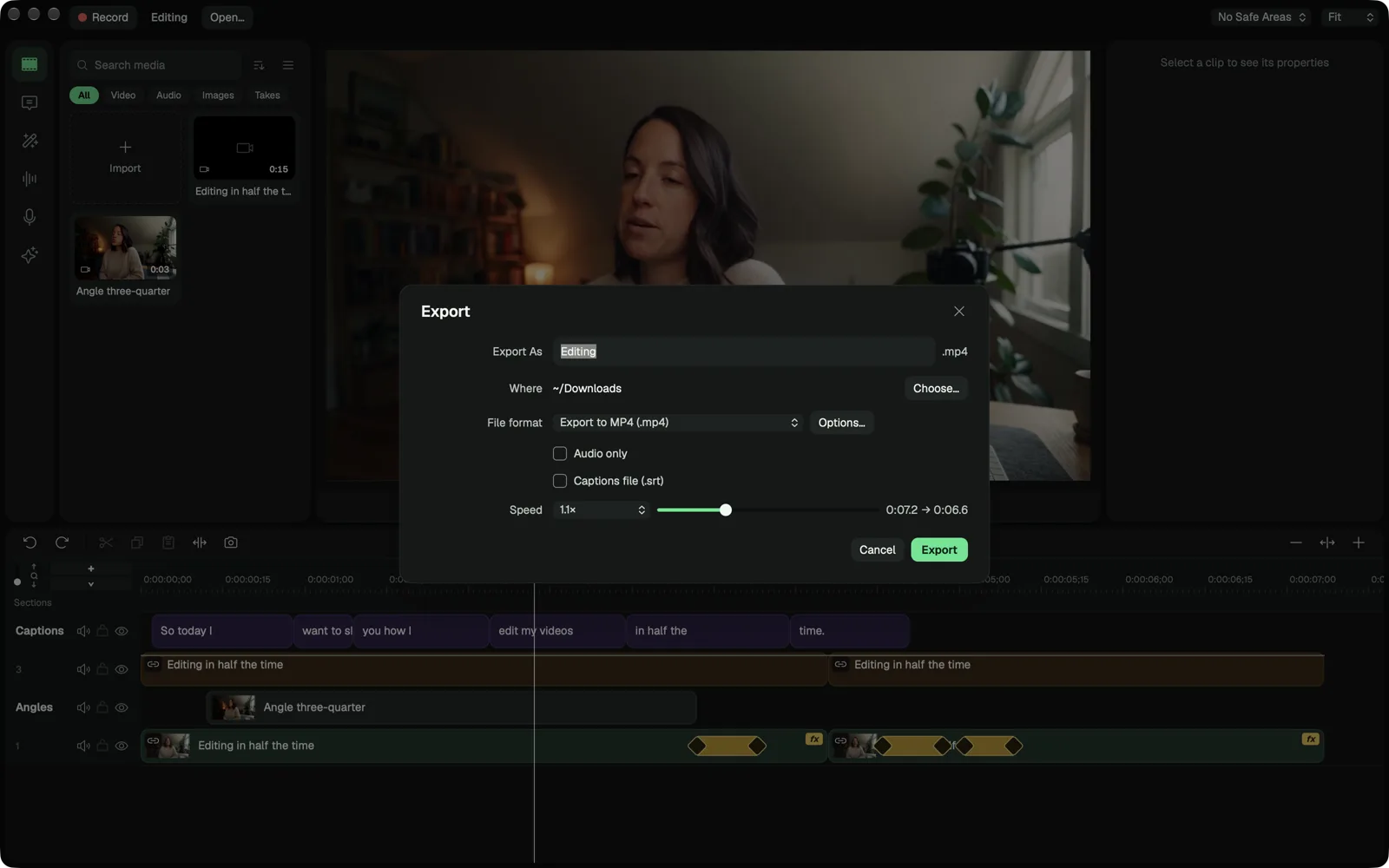
Export… (⌘E) opens the Export dialog:
- File format: MP4 or MOV (H.264, HEVC or ProRes, under Options…), GIF or WebM.
- Audio only: just the sound, as WAV, M4A or MP3.
- Captions file (.srt): subtitles next to the video.
- Speed: from 0.25× to 3×. Many talking-head videos play better a touch faster; the dialog shows the new length.
Beacon draws the export on your Mac’s GPU, the same frames you saw in the preview, at about real time for 4K. It runs in the background while you keep working.
Just part of it
With clips selected, ⌘E opens Export Selection: only those clips, over their span. Selected only audio clips? You get their sound alone. With an in/out range and nothing selected, it exports the range.
Ask for it
Export the project to ~/Movies/Beacon/lighting.mp4 at 1.1× speed,
with a captions file.Checked against Beacon 0.18.0. Something wrong or missing? Open an issue.
Using an AI agent? Point it at /llms.txt, the docs index for agents, or give it every page in one file.